 Leina
Leina  Wanta
Wanta An AI agent joining your company needs a laptop—and an access badge
Sandboxes provide an execution environment. Connector gateways provide authorized access to business systems. Why both matter for enterprise agents, and why an open connection layer is worth building together.
OOMOL
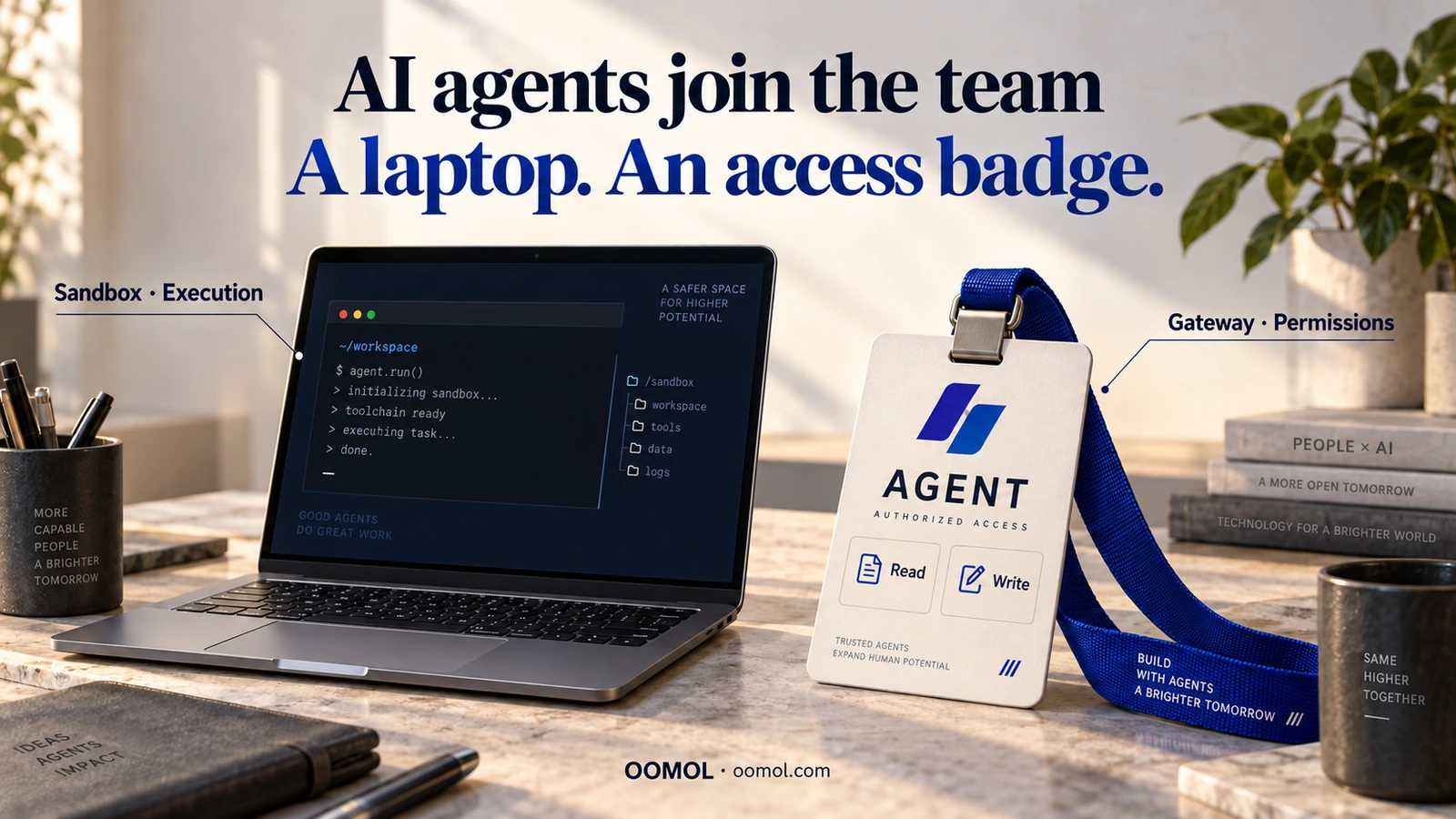
AI-generated conceptual artwork. The laptop and badge illustrate execution and application access.
When a new colleague joins a company, two things usually come first.
A computer lets them open files, run software and do their work. Accounts and permissions let them use office systems, read project documents and work in the CRM, accessing and changing business data within their responsibilities.
With a laptop but no accounts, they still struggle to get started. With accounts but no working environment, many tasks remain out of reach.
AI agents face similar prerequisites when they join the workplace.
They need somewhere to execute tasks, and a way to obtain authorized access to business systems. A sandbox can provide the first. Connection and authorization gateways such as OpenConnector address the second.
These two layers help determine whether a capable agent can take part in real company work.
From answering questions to taking on work
Useful business tasks often span several systems.
Imagine asking an agent to prepare for tomorrow’s customer meeting: check the attendees in your calendar, review recent email exchanges, summarize the customer’s progress from the CRM and write discussion points into the meeting document.
The task requires judgment and actual system access. The agent needs to know where to find information, which account to use, what it may read and where it may save the result.
Ask it to update the customer’s status or send invitations, and the permission requirements change. Reading customer records does not grant permission to edit opportunities. Reading email does not authorize sending it on the company’s behalf.
In our article on agent data security, we discussed why sufficient business context helps agents make better judgments. The next question is how a company grants access to that context and the operations needed to use it.
Employees enter business systems through accounts, roles and permissions. Agents need clear access boundaries too.
A sandbox is the agent’s work computer
Employees run software on their computers. Agents need an execution environment for their work.
They may run code, process spreadsheets, generate files or operate a browser. A sandbox supplies a constrained environment, limiting access to files, processes and network resources according to its implementation and configuration. Anthropic’s engineering article on sandboxing explains the role of filesystem and network isolation in agent execution.
This resembles provisioning a company laptop: supply useful tools and define boundaries around their use.
But a computer that runs software does not automatically gain access to the finance system. A sandbox that runs code does not automatically receive legitimate access to the CRM or office applications.
The sandbox answers: Where does the agent execute, and what does that environment allow?
Access to business systems needs another layer.
The gateway is the access-control system behind the badge
An employee badge represents an identity. The access-control system determines which doors it opens. Accounts, roles and grants perform a similar function inside company software.
For an agent, a connection and authorization gateway handles part of that responsibility: managing application connections and credentials, checking access and submitting permitted operations to the target system.
Connecting an application is just the beginning. A lasting access path must also answer practical questions:
- Whose account is being used, and on whose behalf?
- What information may be read, and which writes are allowed?
- Where are provider credentials stored, protected and refreshed?
- Can a failed call be traced to a useful record and explanation?
- How is access withdrawn when a task ends or responsibilities change?
Putting every application key directly into the agent’s environment spreads those concerns across scripts, settings and deployments. A model or environment change can send the team through the same work again.
A gateway provides a central boundary for connections and authorization. The agent submits requests through permitted interfaces; raw provider credentials remain under gateway management, and operations are checked when executed.
“Please only read data” belongs in task instructions. Enforcing “this call has no write access” requires a system check. That enforcement helps companies delegate real operations step by step.
Two boundaries protect different parts of the task
Sandboxes and gateways can work together.
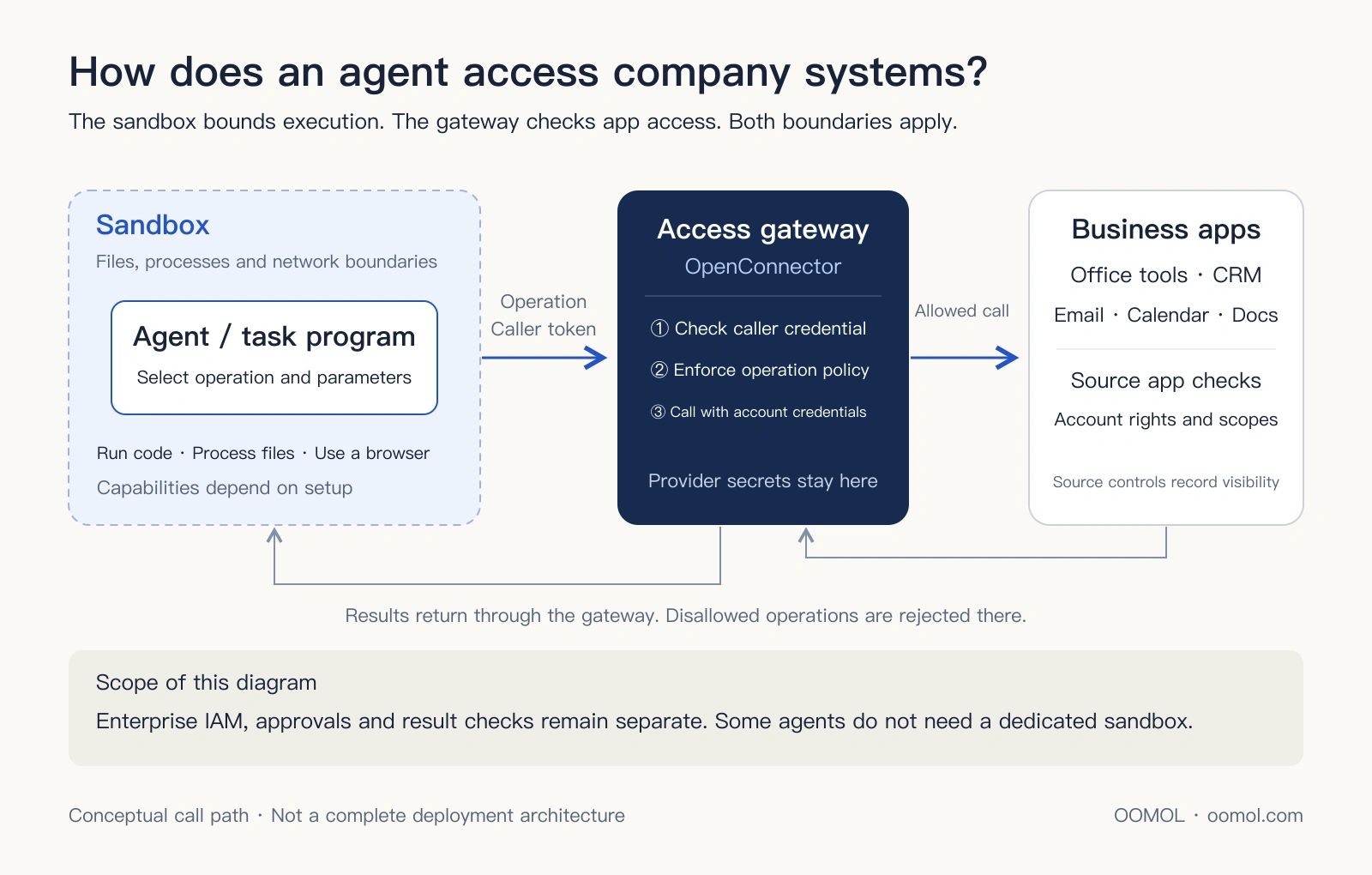
Conceptual call path through a gateway. The sandbox, gateway and source application enforce different boundaries; actual capabilities depend on deployment and configuration.
| Infrastructure | Employee onboarding analogy | Main question |
|---|---|---|
| Sandbox | Work computer | Where can code run, files be processed and tasks execute? |
| Connection and authorization gateway | Access control behind the badge | Which account and business operations may be used? |
A program can remain inside a sandbox while sending requests over an allowed network connection. If it holds credentials that can delete customer records, the sandbox itself does not know whether that deletion fits the business role.
Conversely, routing application calls through a gateway does not manage every downloaded file, local script or temporary artifact. Those still need an appropriate execution environment.
Companies need to manage both the execution environment and access to business systems, especially for agents that run code, process files and act across applications.
Enterprise deployment also needs identity management, orchestration, approval and result verification. Some API-only tasks do not require a separate sandbox. The laptop-and-badge analogy highlights two foundational capabilities: execution and granted business access.
Why the connection layer deserves long-term attention
One successful call can demonstrate an agent’s potential. Ongoing enterprise use asks a harder question: can multiple agents reliably use the same systems over time, under different accounts and responsibilities?
Today one assistant prepares customer information. Tomorrow a different model takes over. Later, a specialist agent handles orders. The CRM, office tools, documents and email systems often remain, along with the work of maintaining connections and authorization.
If each agent integrates independently, teams repeat API adaptation, credential storage, token refresh, operation restrictions and failure diagnosis.
Reusable infrastructure lets new agents draw on existing connections and receive permissions appropriate to their roles. Developers can spend more time on business processes, while companies can apply more consistent access rules.
This is why we care about this layer. When agents take on real work, connection and authorization become recurring needs.
For developers, it is shared engineering worth investing effort in. For companies, it is an architectural boundary worth planning. For investors studying the agent ecosystem, it is an infrastructure category worth examining. Its lasting value depends on reducing repeated integration work, supporting reuse across tasks and sustaining connection, permission and operational responsibilities.
What OpenConnector contributes
OpenConnector is an open-source connector gateway maintained by OOMOL. It manages application connections and credentials, exposing callable operations through SDK, CLI, MCP and HTTP interfaces.
An agent or trusted backend selects an operation and connection. The gateway checks the caller’s credential and operation policy, uses the corresponding account credentials to contact the provider and returns the result.
Developers can inspect operation definitions, input parameters and required scopes, configure allowed or blocked operations in self-hosted deployments and investigate failures with redacted run records. The open runtime, operation definitions and locally executable handlers where available let teams inspect and extend the call path. See the OpenConnector documentation.
Gateway policies work alongside the provider account’s permissions and authorization scopes. Which customer records an account can see still depends on the source application. Sending an email may also require human approval in the business workflow. The gateway needs to work with the company’s wider identity and approval systems.
Teams can start with OOMOL hosting to connect their business, or self-host OpenConnector to manage the gateway, credentials and runtime themselves. Our deployment guide explains the choice.
Infrastructure worth building together
Application connectivity requires ongoing maintenance.
Services differ in authorization, parameters, errors and usage limits. APIs change, tokens expire and companies add more applications and internal systems.
Much of this work can benefit more than one team. Fix pagination in a connector, and other users benefit. Document an operation’s required scopes, and the next developer has less troubleshooting to do. Publish execution code, and others can inspect, correct and run it in their own environments.
That is the purpose of an open gateway: turn integration work repeated across companies into capabilities the wider ecosystem can use.
An open connection layer also preserves options. Agents and models can evolve while connections remain accessible through public interfaces and implementations. Teams that need control over their runtime have code to inspect and a deployment path to follow.
Open source creates opportunities for review, modification and shared maintenance. Security still requires code review, correct configuration and ongoing operations, and third-party API terms still apply. The benefits of collaboration come from completing and reusing that concrete work.
Prepare for your next digital colleague
Treat an agent as a new colleague about to start work. Where will it work? Which systems can it enter? What may it read, and what may it change?
Executable answers to those questions let companies delegate more valuable tasks over time.
We want OpenConnector to be part of that onboarding infrastructure, and we welcome developers who want to build it together. Start with an application you use every day: add a needed operation, fix an authorization issue, improve a parameter definition or report what you encountered during deployment.
Visit OOMOL to explore the product and integration options. To validate a business use case first, connect one application in OOMOL Console and begin with a clearly scoped read operation.
Agents joining a company need a working environment and a way into business systems with appropriate permissions. We are starting at that door, and building it with the community.