

 Leina
Leina  Wanta
Wanta From Meta Muse to Leina: AI Assistants Need Access to Your World
Explore how personal and team AI assistants use context across apps, and how OOMOL and open-source OpenConnector provide account connections, authorization, and app operations.
OOMOL
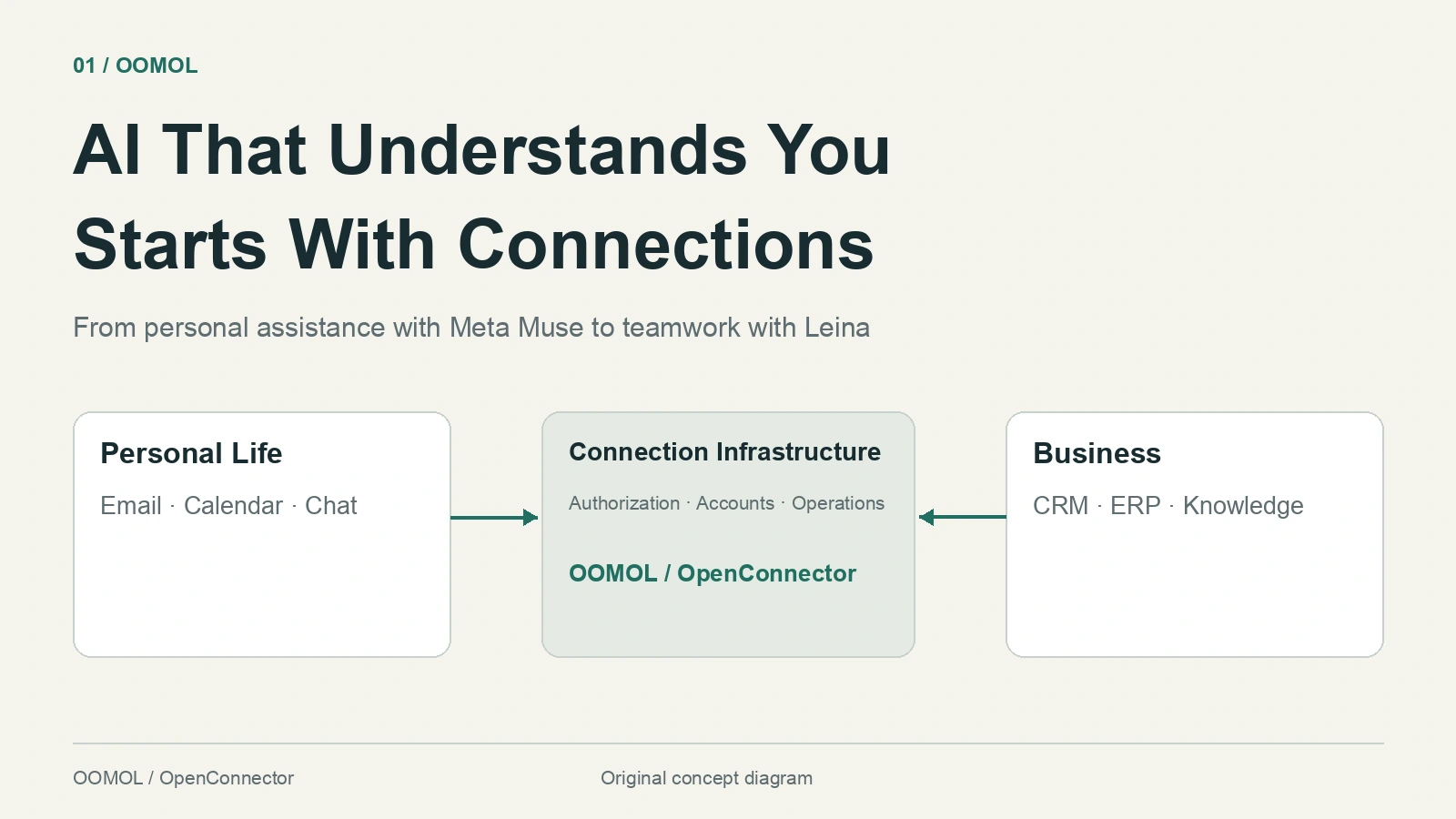
What should an assistant that really knows you understand?
It knows you are traveling next week, that you prefer an aisle seat, and that your customer meeting has just moved. When you ask it to organize dinner, it considers your friends’ dietary requirements, everyone’s availability, and the restaurant you saved on Instagram.
That information already exists. It is scattered across messages, email, calendars, saved items, and work systems, waiting for you to find it, copy it, and explain it again.
This is why people need products like Muse: an assistant that understands their circumstances, remembers what they have shared, and follows through on the work.
Meta introduced its personal AI agent Muse on September 8, 2026. According to the official announcement, it can use a browser in its own cloud computing environment, handle tasks, remember preferences, and keep working after the app closes. People can talk to it in the Muse app or WhatsApp and choose which apps and permissions to make available.
As these experiences enter both personal life and business, they share an infrastructure requirement: give AI durable, authorized access to the systems people already use. That is the role of OOMOL’s connection gateway.
Why an AI Assistant Needs to Know You
Consider two requests.
“Write me a business travel checklist.”
“Help me prepare for my trip based on next week’s customer meeting.”
The second needs much more specific information: where the meeting is, when it starts, which materials the customer sent, whether the schedule conflicts with anything, and your travel and accommodation preferences. The assistant needs to read the current calendar, search email, review documents, and take the next steps within your authorization.
Meta’s Muse design article gives an everyday example: organizing school emails and website information for a child’s return to school, adding important dates to the family calendar, and helping prepare supplies. The useful capability is combining scattered information into work that can be completed. Product design article
Personal life naturally spans apps. Facebook, Instagram, and WhatsApp hold relationships, interests, and conversations; Gmail, Google Calendar, and Google Drive hold messages, schedules, and files. Shopping, travel, payments, and other services each hold another piece.
People rarely think in software boundaries. They just ask: “Help me organize the weekend.”
A useful assistant organizes information around a person’s goals, drawing on multiple apps. What it can actually read or do depends on each platform’s APIs, account types, and the permissions the user grants.
Businesses Need This Too, With More Complex Context
At work, “understand me” becomes “understand our business.”
A salesperson asks: “Help me prepare for tomorrow’s customer conversation.” Relevant context may include CRM follow-up records, the latest requirements in email, order and delivery status in an ERP, and product documentation in a knowledge base.
An operations manager asks: “Which products should we promote next month?” Useful advice needs market research, customer feedback, available inventory, and historical sales, interpreted for that particular business.
| What the assistant needs to understand | Where the information usually lives | Work it can help advance |
|---|---|---|
| Personal plans and preferences | Email, calendars, chats, saved items | Travel preparation, information organization, reminders |
| The customer’s situation | CRM, email, support and team messages | Meeting preparation, risk review, follow-up drafts |
| What the business can promise | ERP, orders, inventory, business databases | Delivery checks, issue investigation, replenishment analysis |
| How the team works | Knowledge bases, shared documents, project records | Finding evidence, reusing methods, preparing handovers |
| Changes in the market | Search, research tools, industry and social data | Competitor monitoring, demand research, opportunity summaries |
These are illustrative tasks. Implementation requires checking the necessary connections, permissions, and available operations individually.
Businesses add another requirement: colleagues in the same company do not all have access to the same information or operations. A salesperson’s access to their customers does not imply access to all financial data. Reading an order does not imply permission to change its price.
An enterprise assistant needs business context, persistent memory, and access controls that work together.
Leina Brings the Assistant Into Everyday Team Chat
Leina brings this idea into team conversations: an AI employee that can use tools where colleagues already discuss tasks and exchange information.
Its website describes several capabilities built around ongoing work.
Assign work in familiar chat channels. The site showcases Feishu, WeCom, DingTalk, Slack, Teams, and Discord. Once a channel is connected, team members can assign tasks in chat, and the assistant uses connected apps as needed.
Keep the background and continue the work. Leina uses Memory to retain team habits and project context. Group chats and private conversations have separate working contexts. Long-running and scheduled tasks can continue in the background and report back when complete.
Turn a proven method into a reusable Skill. Task steps, required apps, and checks can become a Skill that the team reuses and improves for similar work.
Use accounts according to organization and member permissions. Administrators connect business accounts and set the permitted operations. Members use those capabilities within their authorization without receiving passwords or raw tokens.
For example, a team could design a workflow around this request:
@Leina, organize this week’s customer feedback, check the customer records and delivery situation, and list the issues that need follow-up. Start with a draft.
This requires information from multiple systems, an understanding of the team’s priorities, and clear access boundaries. Chat is the entry point, memory preserves the background, Skills organize the method, and the connection layer provides access to the tools.
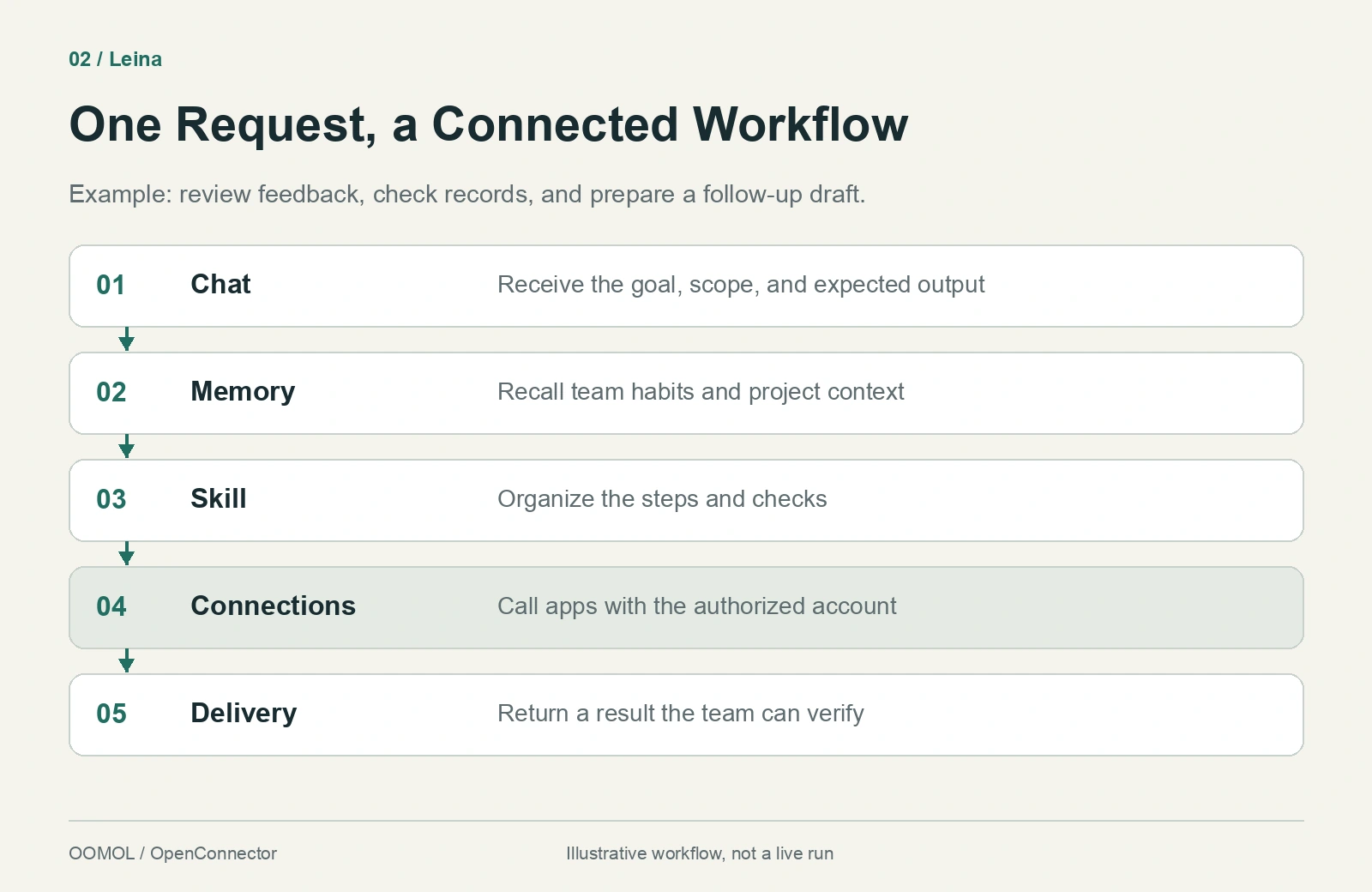
Conceptual workflow for a team assistant working across systems; not a product screenshot or an actual execution log.
OOMOL: A Gateway to the Systems an Assistant Needs
Build this kind of assistant and recurring questions soon appear.
How does each platform authorize access? What happens when a token expires? If someone connects two inboxes, which one should this task use? Which permissions does an operation require? Where is the execution record when a call fails?
As the number of apps grows, these questions become a continuing maintenance responsibility.
OOMOL brings account connections, authorization, credential management, and app operations into reusable connection infrastructure. An agent or product backend can access authorized services through a consistent calling model, leaving more attention for task understanding, memory, and user experience.
Broad Coverage Brings More Context Into a Task
On September 23, 2026, OOMOL’s public catalog API listed 1,559 services and 18,035 operations. These are catalog counts; each task still requires checking the target service, operation implementation, and authorization conditions.
Coverage matters when a task crosses email, documents, customer records, analytics, and business systems: can the developer find the access capabilities it needs?
Depth matters too. After connecting an app, the ability to search records, read details, create content, or update data with permission determines how far the assistant can take a task.
Authorization and Credentials Support Ongoing Access
With OOMOL’s hosted connections, the gateway holds provider credentials and makes the actual calls. Application code selects an account by its connection identifier without having to hold every provider’s raw token. SDK documentation
For assistants serving multiple users, ProjectConnector supports individual end-user accounts. Each user authorizes their own services, and the product backend selects the right account for an operation. SaaS integration guide
Explicit Operations and Execution Records Make Connections Manageable
OpenConnector provides input and output schemas, required permissions, connection identity, policies allowing or blocking operations, and redacted execution logs. Developers can inspect what is permitted and investigate individual calls after a failure.
These controls work alongside the assistant product’s own user identities, task confirmations, and business approvals. Drafting a customer follow-up and actually sending it, for example, should follow the respective execution processes defined by the product.
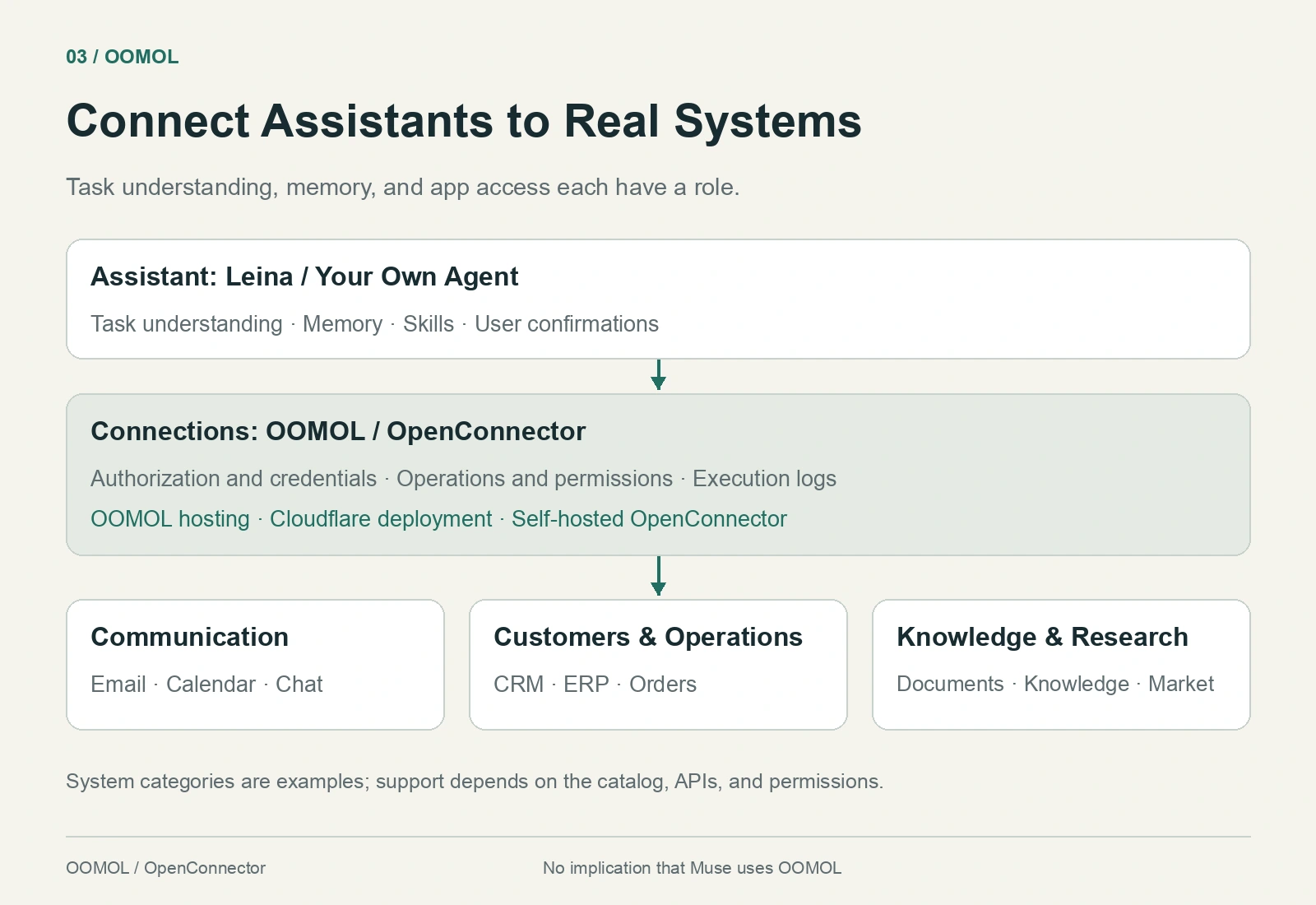
OOMOL’s place in an assistant architecture. System categories illustrate typical needs; actual support depends on the current catalog and API permissions.
OpenConnector Gives Teams Control of Connection Infrastructure
As assistants become more involved in business operations, teams care more about where credentials are stored, where the connection service runs, and who can inspect and restrict its behavior.
OOMOL offers hosted connections and a self-deployment path through the open-source OpenConnector project. Teams can choose based on launch speed and operational requirements:
| Path | Who it suits |
|---|---|
| OOMOL hosting | Teams that want to connect apps quickly while OOMOL operates the hosted connection and credential layer |
| OpenConnector on Cloudflare | Teams that want the connection service in their own Cloudflare environment |
| Self-hosted OpenConnector | Teams that want to manage the runtime, credentials, policies, and execution records in their own environment |
OpenConnector’s open-source scope includes the connection runtime, provider definitions, operation schemas, and local execution code where implementations are available. Third-party services and their API terms remain under the respective platforms’ control. Self-hosting guide
On September 23, 2026, the GitHub repository had 5,873 Stars and 512 Forks. These indicate community interest and derivative development activity. For a team choosing infrastructure, the practical value is being able to inspect implementations and operation contracts, then deploy and maintain the service when needed.
The Next Generation of Assistants Connects Understanding With Action
Muse shows one direction for personal assistance: remember what matters, keep tasks moving in the background, and return when the user needs to make a decision. Leina brings ongoing collaboration into team chat, combining memory, Skills, and permission-based app access for everyday work.
These experiences need models that understand tasks, memory that preserves context, and a dependable way to reach real systems.
To understand a person or a business, an AI assistant needs authorized access to the information and tools they use. OOMOL provides a reusable connection gateway for that access.
To start with a concrete team task, try Leina, connect the necessary apps, and ask for a work product you can verify.
If you are building your own assistant, start with the OOMOL Connector SDK. If you need control of the connection runtime, explore OpenConnector.
Sources and scope: This article uses official Meta and Leina descriptions, OOMOL documentation, and catalog and GitHub data checked on September 23, 2026. Products were not independently tested. Muse is discussed as an example of personal AI assistance; this does not imply that Meta Muse uses OOMOL or that the companies have a partnership. Illustrations are original conceptual diagrams.